Mobtag

The product, on the job

See the software doing the work your sector already has to prove

In practice, for hire fleets that leave the yard

These are real Mobtag screens — dashboard, forms, stock, reports, labels, and the job board — with the kind of problem each one takes off the table. Same platform, configured to the way your sites, yards, and auditors already talk.

Browse sectors
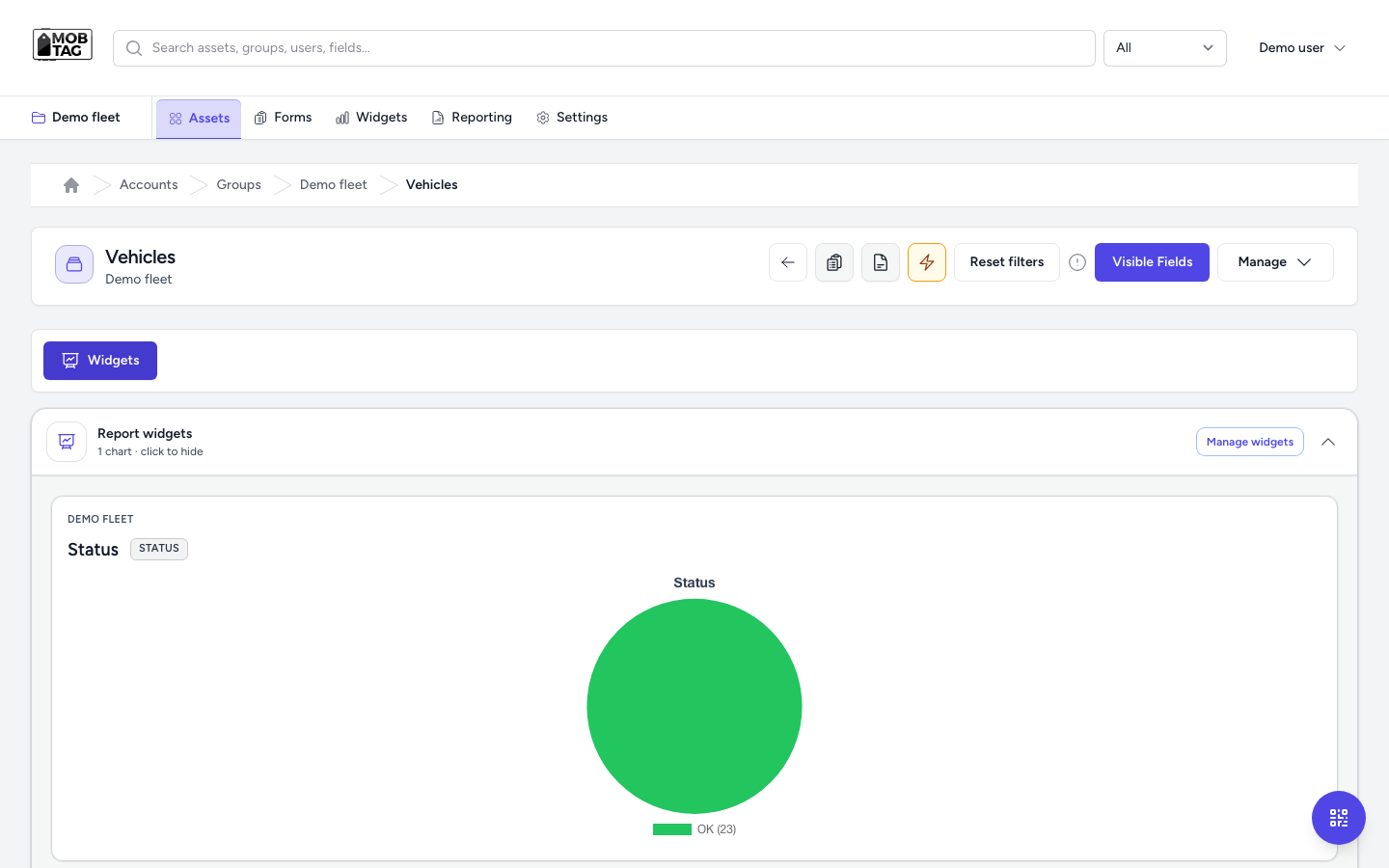
Mobtag charts on the asset list, showing live outcomes for the group

Product screen

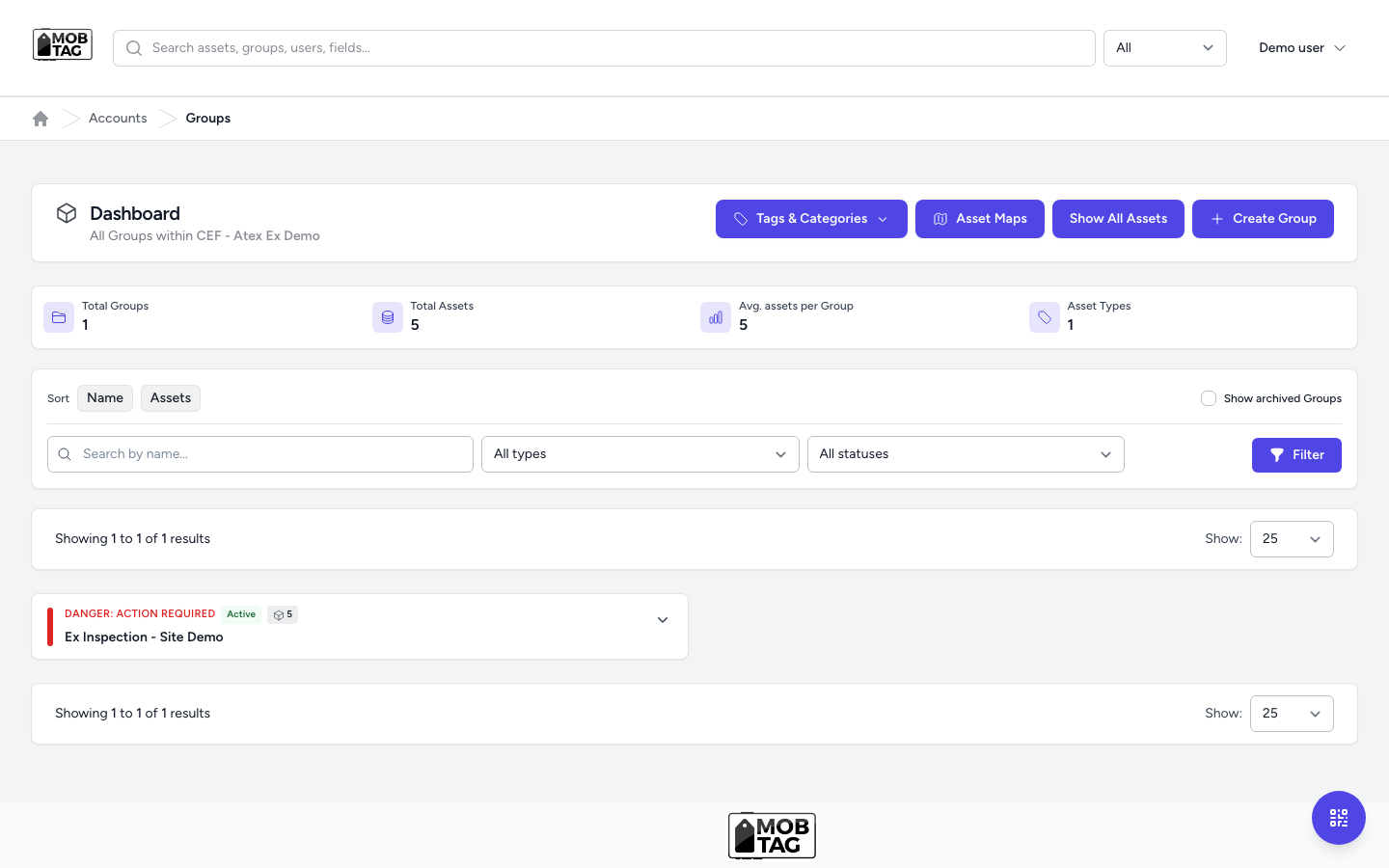
Mobtag account dashboard showing groups, action-required status, and asset counts

Account at a glance

The morning picture, before the first phone call

The problem. Which group is overdue, how many assets you actually have, and where the danger sits — that picture usually lives in someone’s head, or in a spreadsheet that was true on Monday.

What Mobtag does. The account dashboard lists every group, marks the ones that need action, and puts the counts on the screen your team already opens. From there it is one step into tags, maps, the board, or the full asset list.

For example. A hire desk or a compliance lead opens the account and sees the fleet group flagged for action next to the stores group, with the totals on the same row. Nobody has to ask three people for a status before the day starts.

  • Danger and active status on the group, not in a side note
  • Asset counts without a monthly rebuild
  • One jump into tags, maps, the board, or every asset
Tool & equipment hire

Product screen

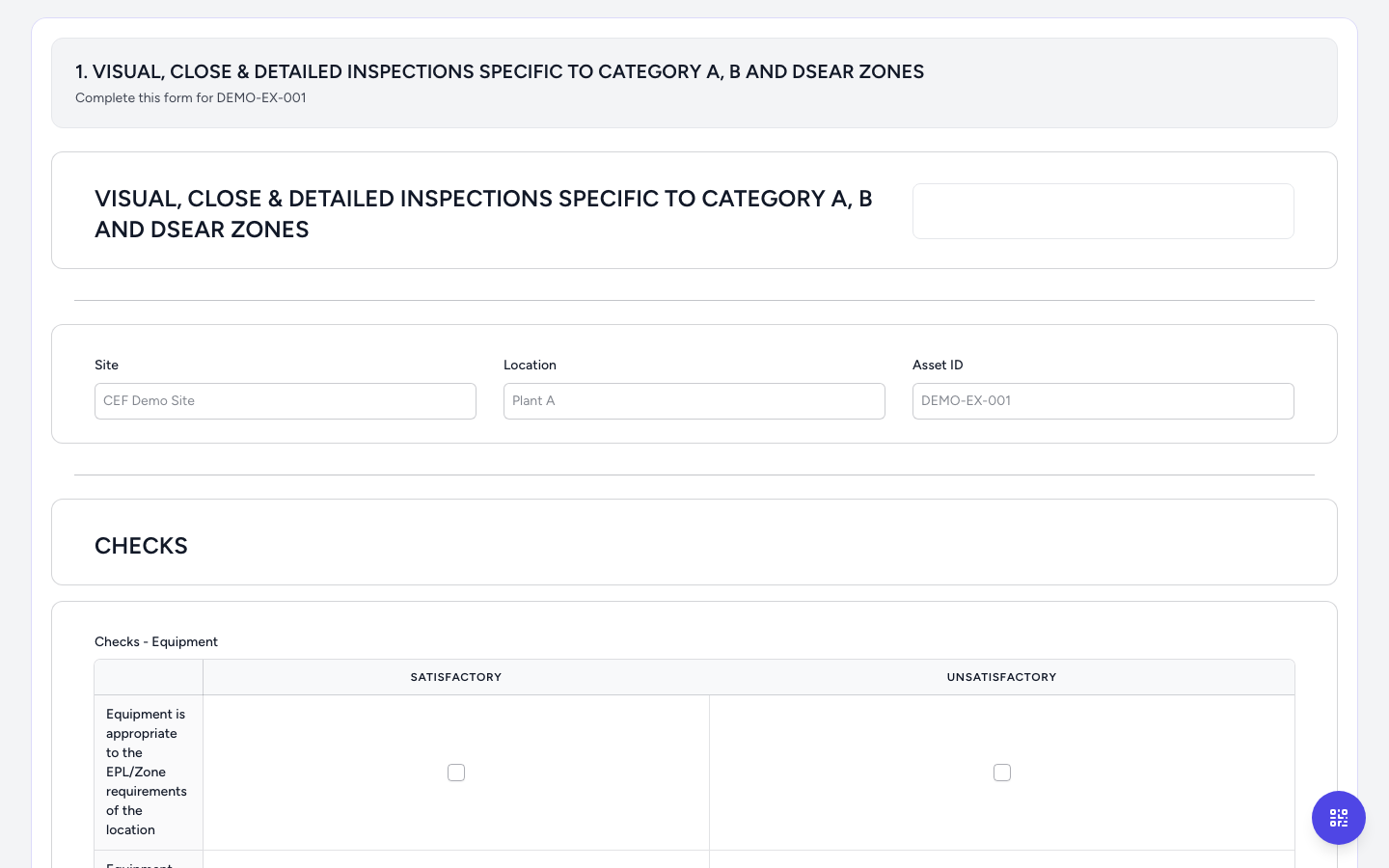
Live preview of an inspection form for the asset, with site, location, and the checks

Checks that write back

The inspection stays on the asset, not on a clipboard

The problem. A passed check in a folder does not stop the next person using kit that should be quarantined. Re-keying the same due date into a second system is where the record goes wrong.

What Mobtag does. Forms are filled against the asset. Identifier, dates, and outcome load from the record and write back on submit. Rules and an approval step sit on the form when a sign-off has to happen before the job counts.

For example. A lifting inspection or a vehicle walkaround captures notes, the internal ID, the due date, and the outcome on the item itself. The next scan opens that history. The monthly report is counting the same submissions — not a retyped list.

  • The check and the asset are the same record
  • Approvals and notifications when a submission must be signed off
  • Templates you reuse on the next site instead of rebuilding the form
Lifting & LOLER

Product screen

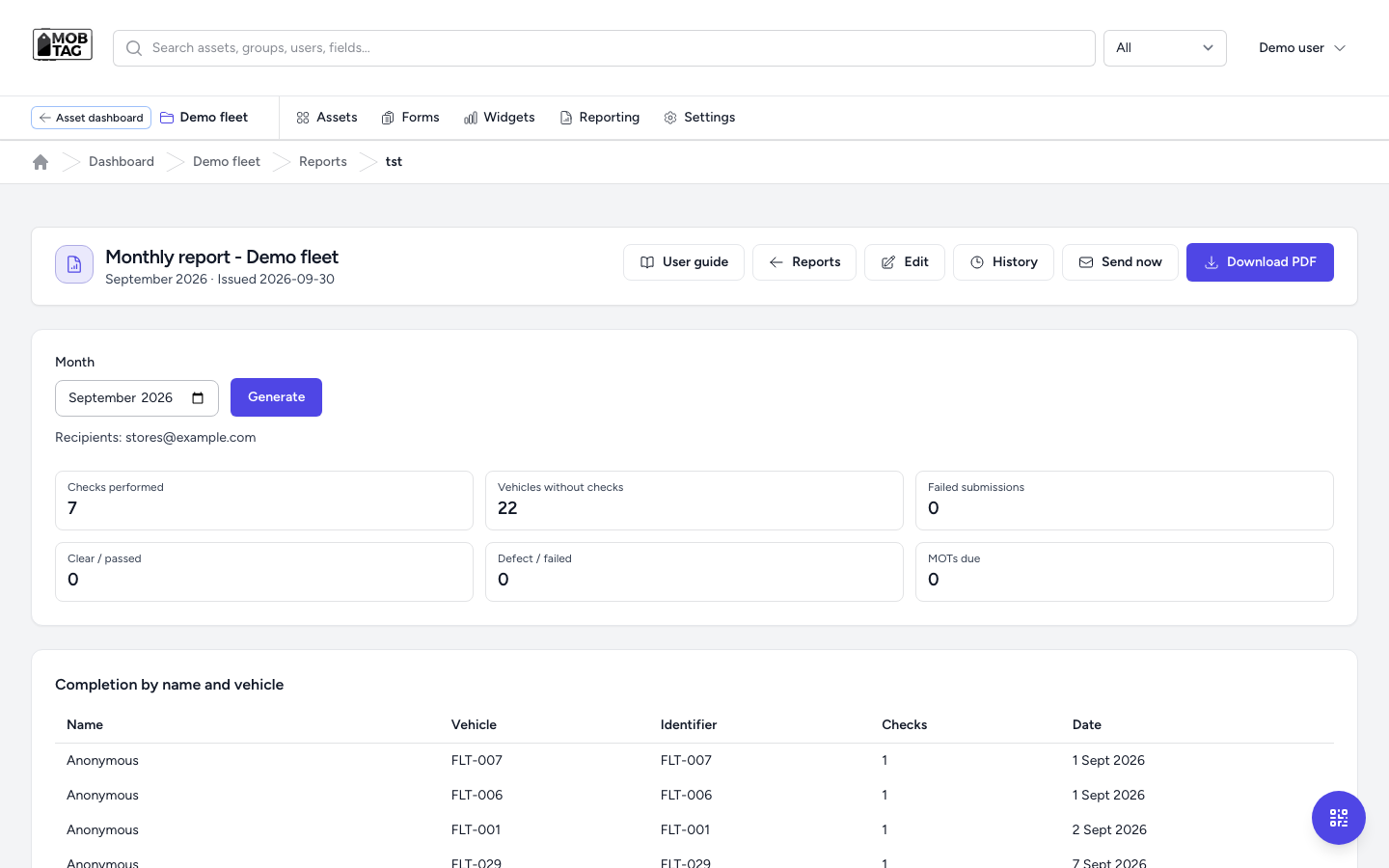
Mobtag monthly compliance report with checks, defects, MOTs due, and PDF download
Outcome chart on the Mobtag asset list, the same data the report is counting

Evidence you can send

The compliance pack is already the live data

The problem. The week before an audit or a contract review, someone rebuilds a spreadsheet from inboxes. The numbers in the room do not match the yard.

What Mobtag does. Reports summarise checks, gaps, defects, and due dates for a period. You preview them on screen, download a PDF, or send them to the people who need them — from the same submissions the field just made.

For example. A fleet or a lab runs the month: checks performed, items with no check, failed submissions, and what is coming due. The pack goes out without a night in Excel. Charts on the asset list show the same mix while the team is still working.

  • Preview, PDF, and send from the report — not a parallel workbook
  • Gaps (no check, defect, due soon) are rows, not a memory
  • Widgets on the asset list so the picture is visible between reports
Calibration

Product screen

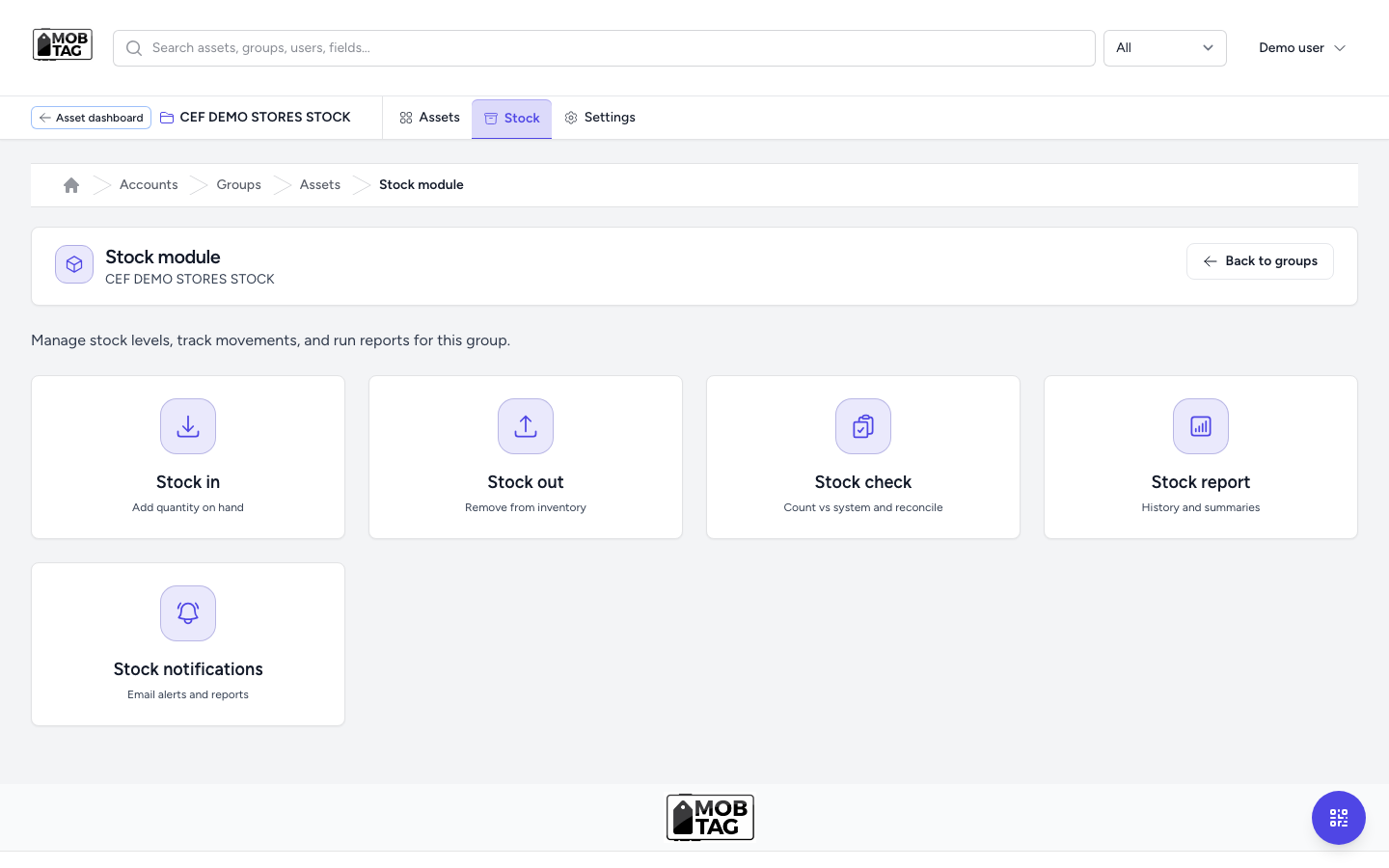
Mobtag stock module with stock in, stock out, stock check, report, and notifications

Stores and hire stock

The yard and the books finally share a number

The problem. Stock in, stock out, and “we thought we had one” happen in different places. Shortages show up when a job is already late, or when finance writes off a surprise at year end.

What Mobtag does. A stores group has stock in, stock out, a physical check against the system, a history report, and email when a level crosses the line you set.

For example. A tool-hire counter or a materials store records the movement on the same asset the QR opens. Low stock is a notification while you can still reorder — not a discovery when the van is loaded.

  • In, out, and a count that reconciles to the system
  • History you can hand to a dispute, a warranty, or an auditor
  • Alerts before a shortage becomes downtime or a failed job
Materials & certificates

Product screen

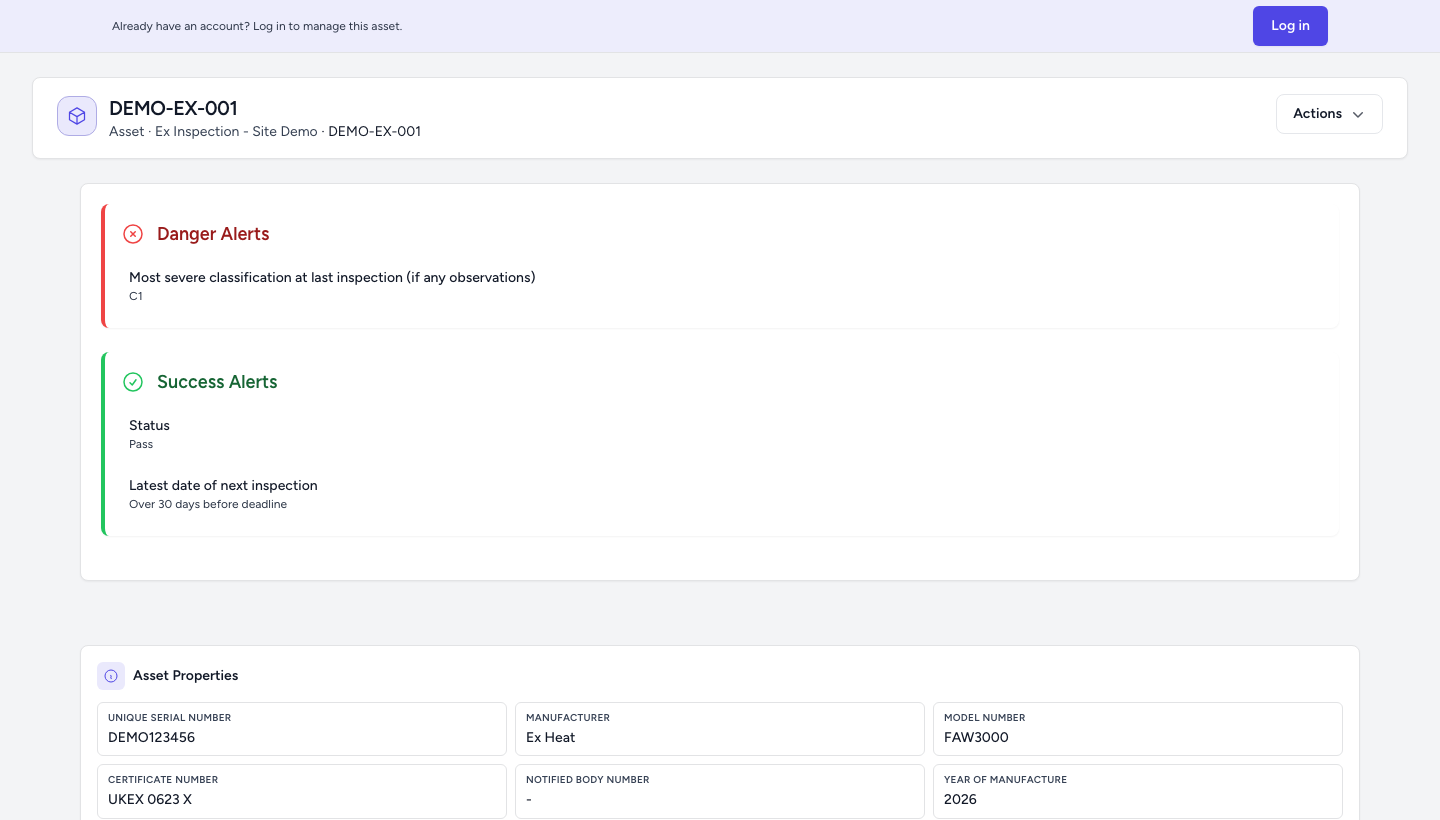
The public asset record opened from a tag, with the name, alerts, and fields
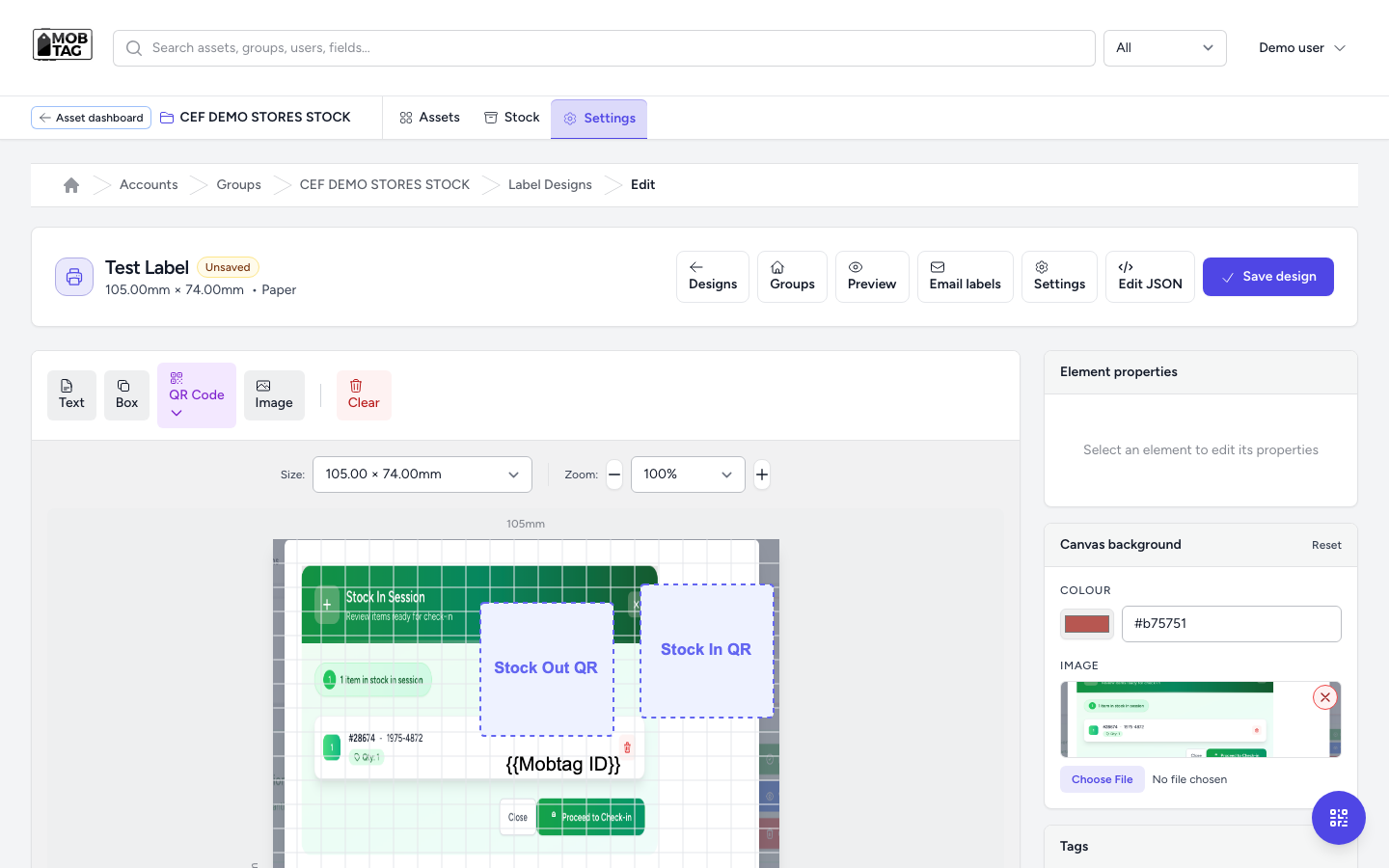
Mobtag label designer with a print-size QR label for the group

QR that opens the truth

Anyone with the tag sees the current record

The problem. A sticker with a serial number still sends people to a folder, a chat thread, or the one person who “knows that van”. Labelling a new site is a print job every time.

What Mobtag does. You design the label to the size you print, put the QR on the asset, and the scan opens a branded page: name, identifier, photo, and the fields your team edits. Guests can be asked for an asset password. Signed-in staff skip it.

For example. A PAT tester, a site visitor, or a new starter scans an appliance or a van and lands on that item — not a generic homepage and not last year’s PDF. The label you printed is the door to the history.

  • Label designs sized for the stock you already print
  • The public page and the internal record are the same asset
  • Optional password on the tag for guests; your team walks straight in
PAT testing

Product screen

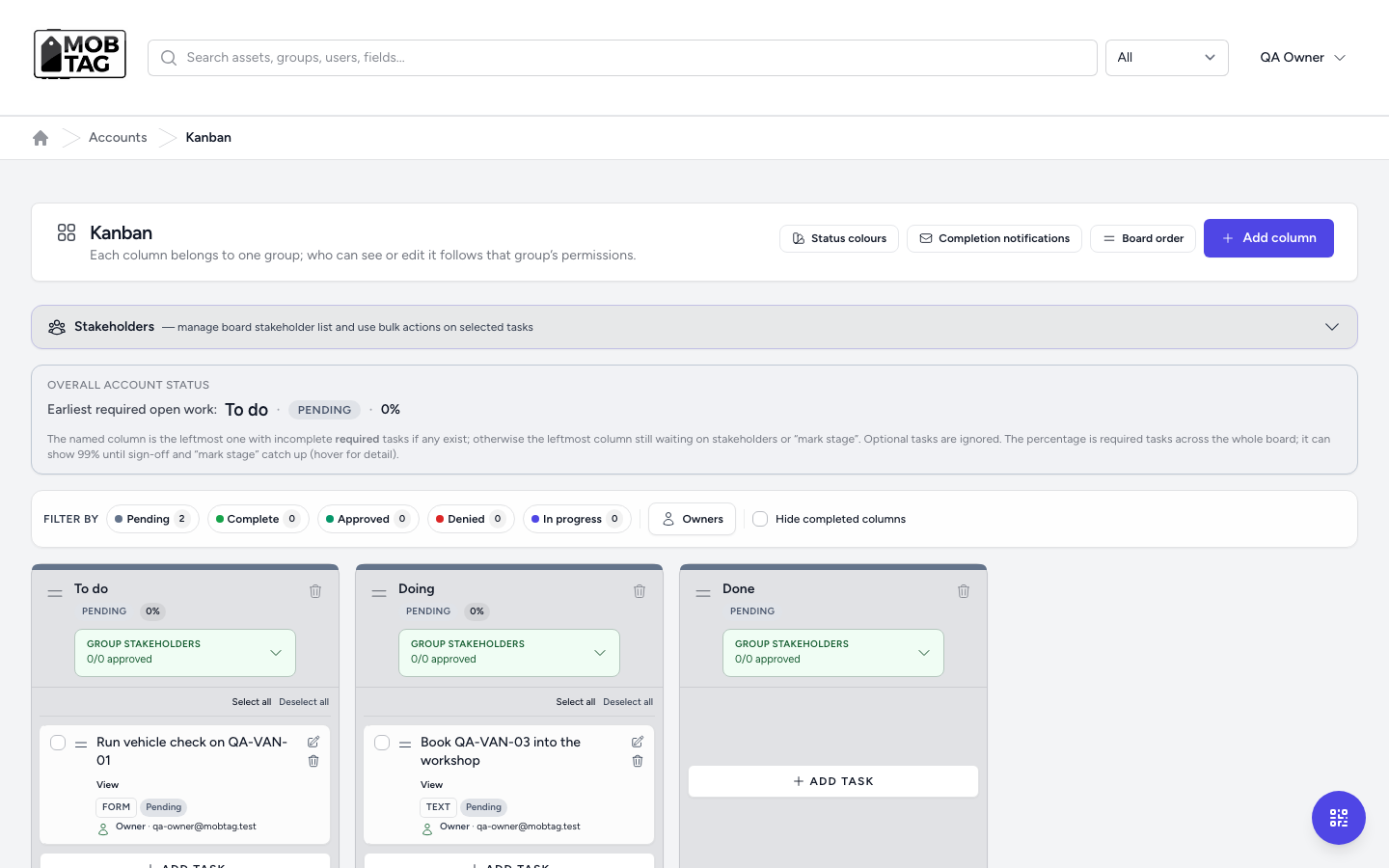
Mobtag kanban board with To do, Doing, and Done columns and tasks tied to assets

Work in motion

The job has a stage, an owner, and a form

The problem. Service work lives in inboxes. The workshop thinks it is booked, the account manager thinks it is done, and the customer has a photo with no sign-off.

What Mobtag does. A board for the account: columns for the stages you use, tasks tied to a form or a note, an owner on each card, and a live read of how much required work is still open.

For example. A service contractor moves “book the van into the workshop” from To do to Doing. The form on the asset is the evidence. The open-work percentage is on the board, so the status meeting is not where you find out.

  • Stages you name, permissions that follow the group
  • Tasks linked to the form, not a separate to-do app
  • A single percentage of required work still open
Equipment servicing

Sectors

The same platform, a different expensive mistake

Every sector below is paying for the same pattern: the physical thing and the proof have drifted apart. Mobtag puts the proof back on the thing. Here is what that looks like in the work.

Tool & equipment hire

Kit leaves the yard and the counter cannot say if it is on hire, damaged, or still in the bay.

A returned breaker is scanned back in with a condition note and a location before it is hired out again. The map and the hire record are the same asset.

How this sector uses Mobtag

Lifting & LOLER

The inspection happened. The evidence did not travel with the hook, the sling, or the hire fleet.

The competent person completes the form on the item. Quarantine is what the next person sees on scan — not only what was filed in a PDF the week before the visit.

How this sector uses Mobtag

Calibration

The retest date lives in one calendar. The certificate lives in another inbox. The instrument is on a bench nobody updated.

Due window and last certificate sit on the scan. The month’s gaps — no check, out of tolerance, coming due — show up in the report before the customer asks.

How this sector uses Mobtag

Ex / hazardous area inspections

The motor, the gland, and the last inspection are in different handover packs after every contractor change.

The periodic check, the photo, and the sign-off land on that asset’s timeline when the engineer leaves site. The next visit starts from the record, not from a reconstructed pack.

How this sector uses Mobtag

Materials & certificates

The certificate in the folder and the lot on the truck are not obviously the same lot when the auditor arrives.

Scan-in ties the material record to the movement. Traceability is a filter on the live data, not a night of matching PDFs to heat numbers.

How this sector uses Mobtag

Equipment servicing

The job was done on site. The desk still has it open, and the customer has a photo in a chat.

The engineer runs the checklist from the QR, attaches the sign-off, and the board moves. The customer-facing history and the internal job are the same file while the van is still there.

How this sector uses Mobtag

PAT testing

Pass and fail history is a stack of stickers plus a spreadsheet that drifts from the appliance on the desk.

Each item keeps its schedule and last result. The label you print is the door to that history, so a retest does not start by asking who tested it last year.

How this sector uses Mobtag

Modular & skid builds

Factory test, despatch, and site snagging are three folders for one serial. Year-three O&M cannot find the chain.

The unit’s tag is the same ID from the factory hold point through handover. A warranty question years later opens the record the factory started.

How this sector uses Mobtag

Hose management

A hose is replaced and the pressure-test record stays in the fitter’s van.

Test date, interval, and identity stay on the hose. The next replacement starts from the record and the due window, not from memory.

How this sector uses Mobtag

Car park booking

Bays and permits are a whiteboard the night shift cannot see, and a spreadsheet the barrier does not read.

The bay or permit is a tagged record with a simple operator flow, so the gate and the office are looking at the same allocation.

How this sector uses Mobtag

The rest of the platform, on the same record

Maps, fields, alerts, imports, and the client view sit on the asset the QR already opened. Nothing important lives in a side spreadsheet unless you export it on purpose.

QR & access

Faster work, no specialist hardware

A unique QR is the single front door to an asset. Staff and contractors get straight to the live record—no re-keying, no wrong spreadsheet row—so call-outs and handovers do not start with 20 minutes of finding context.

In practice

  • Bulk, branded codes so rollout scales without a print shop bill each time
  • Any phone or tablet, so you are not standardising on costly rugged kit
  • One link from tag to data so your customer and your auditor see the same truth

Google Maps

Decisions you can make with your eyes open

Pins and tags show how geography hits cost: duplicate kit between sites, stock sitting where it is not earning, and travel time that could be planned. Leadership sees utilisation, not a monthly “we think it is about…” estimate.

In practice

  • See assets and stock locations without another GIS project
  • Filter and report by site or tag so project pricing reflects reality
  • Faster H&S and operational reviews because the picture is in one system

Customisable fields

Consistent data without a full-time data janitor

You control the layout and fields for each team or client group, so the same class of equipment always captures what finance and compliance need—reducing “fix it in Excel” projects after go-live.

In practice

  • Faster user adoption because the screen matches how people work
  • Field sets and validation aligned to your audit chain
  • Less time reconciling when two teams named the same thing differently

Stock management

Numbers finance and the yard agree on

Scanned movements and thresholds give you a stock position you can use for buying and billing—so you are not over-ordering “just in case” or writing off surprises at year end.

In practice

  • Less shrinkage and emergency freight from “not sure we had one”
  • History that supports warranty and customer disputes without a file dig
  • Exports you can hand straight to the ERP or accountant

Digitalising forms

Inspections and sign-off without the paper tax

Build the forms you already use: signatures, photos, and PDFs stay on the asset, so the next retest, audit, or customer review does not start with re-scanning a folder.

In practice

  • Cut print, post, and storage—real line items on any P&L at volume
  • Audit trail by default, not a scramble the week before a visit
  • Reusable templates so a new site or product line reuses 80% of your IP

Client dashboard

One current picture for managers and customers

Give clients and internal teams a status view without chasing the latest thread of attachments. The board pack and the yard are not on two different stories, and you spend meeting time on decisions, not on reconciling versions of the same week.

In practice

  • A view your customer can trust: the same data your people work from
  • End-of-programme and contract check-ins in one place instead of a mail round-robin
  • Faster levers on spares, cover, and resourcing when the picture is live

Notifications

Nudges you can act on, not a mailbox you ignore

Send due dates, stock shifts, and threshold crossings to the workflow where people are—not buried in email until after a miss. Reroute stock, reassign work, or warn a client while you still have room to plan.

In practice

  • Inspection, calibration, and contract milestones in the work path
  • The people who can act get the signal before it becomes a penalty or downtime
  • Defined lines for stock and status, crossed early enough to be useful

Reporting & exports

The same truth for the board, finance, and the site

Run filters, saved views, and exports on live data so the board, finance, and the field are not each maintaining a parallel “official” number. The export traces to scans and submissions, not a chain of re-keying the night before a review.

In practice

  • Reports that match how you already measure performance
  • Output in the formats the board or a partner system already takes
  • Evidence in the file that matches the numbers in the room

Bulk data import

Onboard and migrate without corrupting production

Validate and load big CSVs before bad rows become customer-facing. You get a clear list of what failed and what to fix, so a new site or fleet is a controlled go-live, not a weekend in production re-keying what the file should have rejected.

In practice

  • Row-level checks so duplicate serials and wrong template fields never hit live
  • A repeatable import path: same runbook for a site, a fleet, or a client data dump
  • A go-live you can schedule because the file is clean enough before you flip the switch

See it on your assets, not ours

Bring a process that still runs on paper, a spreadsheet, or a folder. We will walk the same screens against your sites, your forms, and the audit you actually have to pass.

Talk to us